

Personal Design Decision - Choosing a Tablet for Note-taking
Introduction:
While I prefer writing notes with pens of different colours over typing, they are harder to organize (reorganize), more vulnerable to liquid spill, and less likely to be used later. After losing one physics notebook on October 3rd, I felt urged to buy a note-taking tablet to replace my vulnerable notebooks.
Requirements:
Stakeholders:
Me, the direct user.
My future notes, which will be recorded and stored by the tablet.
Students whom I may share my notes with.
Objectives:
High level objectives (HLO) of this tablet:
Provide a suitable platform to record and store my notes in future undergraduate study. (S1,2,3)
Help me to improve the efficiency of organizing and using notes. (S1,2,3)
Detailed objectives (DO):
Supports handwritten-style note-taking with stylus. (HLO1)
Has appropriate size and weight for note-taking and carrying. (HLO1,2)
Allows usage for a whole-day. (HLO1,2)
Is capable for storing and using a considerable amount of notes and other resources. (HLO1,2)
Can be obtained within a reasonable cost. (HLO1)
Note: any accessory available with the tablet can be taken into account, along with its cost.


Comparing Surfaces first,
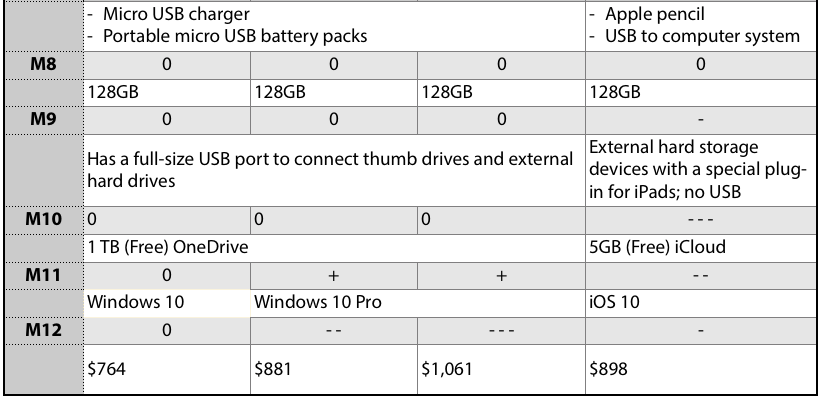
The three Surfaces share some same softwares and accessories so that seven of their metrics are therefore assessed equal.
Higher prices accompanies better performance in display screen quality and the Windows system; however, Windows Pro is unnecessary for a normal student to take notes[9].
Surface 3 has a lighter weight and a longer battery power than the other two because of its lower processing speed[10]; these are the two vital features that make Surface 3 a more ideal choice to replace my notebook than Surface Pro 3 and 4.
There are more differences between Surface 3 and iPad Pro.
According to both technical specifications and user experiences, Apple Pencil’s tip creates a natural fluency for drawing, while Surface Pen’s right-click button and eraser allow consistency when writing notes. As the main purpose of this stylus is to take notes, Surface Pen is preferred.
The main problems of iPad’s note-taking software and whole iOS system is their poor availability to share original documents with Windows system that the ECF computers use (e.g. documents from Notability, Pages and Numbers need to be exported and their format change); meanwhile, iPad only comes with 5GB iCloud free, which I have already used up, but OneDrive allows 1TB of notes.
Compared to the vital weaknesses listed above, the lighter mass of iPad becomes insignificant.
Recommendation:
Surface 3 stands out after analyzing the four tablets based on my primary objectives for this tablet: to replace my notebook and elevate my study experience for the following reasons:
iPad is outstanding for drawing, but Surface is better for fluently writing notes because of its digital eraser and notebook software;
I enjoy using Pages and Numbers, etc., but Surface provides Microsoft Office which is required in some courses;
Surface Pro 3 and 4 perform better in some aspects, but Surface 3 provides the least mass, enough size, longest battery power and equal writing experience with the lowest price.
Therefore I recommend Surface 3 to myself and any first year undergraduate engineering student in same situation like me.
References:
1
Plain Notebook - Pocket 3 ½" x 5 ½"
http://www.moleskine.com/en/collections/model/product/plain-notebook-pocket
2
Hilroy 3-Hole Coil Notebook, 1-Subject, 140 Pages
https://www.amazon.ca/Hilroy-1-subject-Notebook-Assorted-13224/dp/B007Z7MIK6/ref=sr_1_3?ie=UTF8&qid=1478378969&sr=8-3&keywords=notebook&th=1
3
Microsoft OneNote
https://www.onenote.com
4
Notability Review (Molly Klinefelter, 2013)
http://www.laptopmag.com/reviews/apps/notability
5
Surface Pen
https://en.wikipedia.org/wiki/Surface_Pen
6
Apple Pencil
http://www.apple.com/apple-pencil/
7
Apple Pencil vs. Surface Pen (Sumit Passary, 2015)
http://www.techtimes.com/articles/108916/20151123/apple-pencil-vs-surface-pen-each-with-its-pros-and-cons.htm
8
iPad Pro vs Microsoft Surface: A tablet showdown for writers and artists (Serenity Caldwellby, 2015)
http://www.imore.com/ipad-pro-vs-microsoft-surface-which-better-artists-and-writers-1
9
Windows 10 Home vs Windows 10 Pro (Martyn Casserly, 2016)
http://www.pcadvisor.co.uk/feature/windows/windows-10-home-vs-windows-10-pro-uk-difference-3618710/
10
Microsoft Surface 3 vs Surface Pro 3: Which is best for you? (Mihăiță Bamburic, 2014)
http://betanews.com/2015/03/31/microsoft-surface-3-vs-surface-pro-3-which-is-best-for-you/

Comments